
Power BI for Strength & Conditioning Coaches
The most specific Power BI course for S&C coaches — gym reports, CMJ, GPS and full data workflow.
Data Preparation
No code, just built-in Power BI tools.
Calculations
DAX made simple, step by step.
Visualisation & Reports
Build the reports S&C coaches actually use.
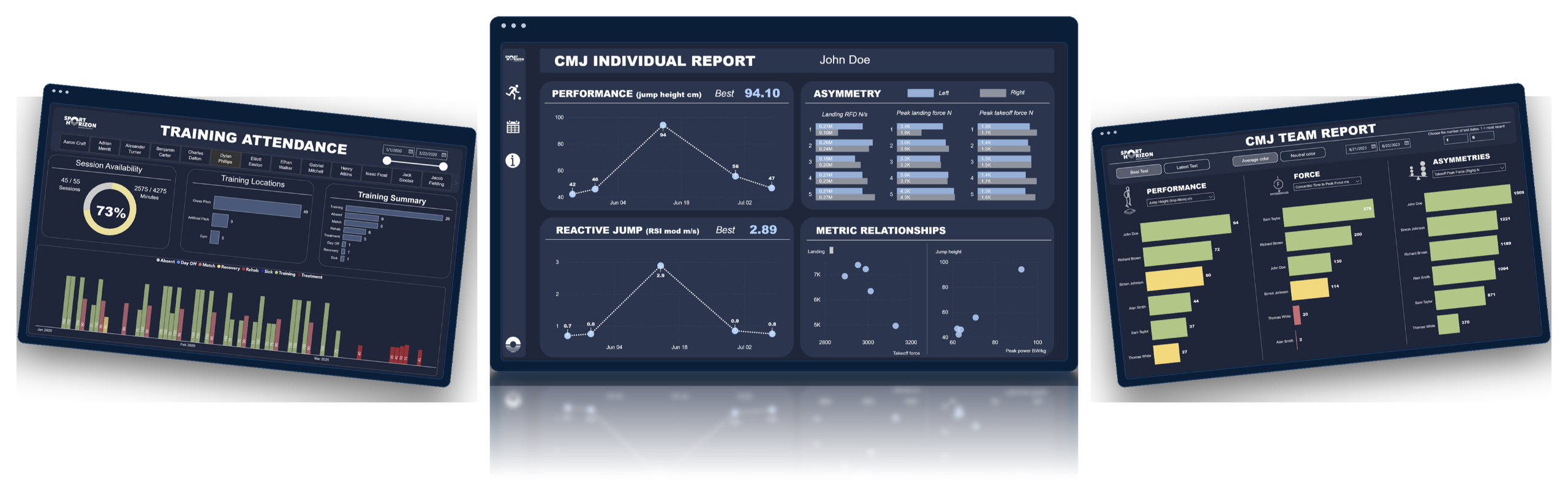
A Glimpse of What You’ll Build
Explore 3 of the dashboards you’ll build in this course with more projects and dashboards waiting for you inside.
We support you on the journey
I would like to emphasize the remarkable responsiveness of the course's creators, Ciaran and Johannes, in swiftly addressing any challenges we may encounter during the learning journey. Their unwavering support has proven to be an invaluable asset, significantly enhancing my overall learning experience.
Yannis Irid
PhD Candidate, INSEP French National Institute of Sport

Brendan Lazarus
North Melbourne FC — Head of Sport Science
“The Power BI for Sport Scientists course was an absolute game-changer for anyone in the high-performance field. The tailored content and real-life sports data examples provided an incredibly insightful and applicable learning experience. From athlete performance tracking to in-depth statistical analysis, this course offered a comprehensive understanding of how to harness Power BI's capabilities for optimizing sports data management and decision-making processes.”

Ryan Davies
QPR FC — Sport Scientist
“This course has transformed how I report GPS data and hugely increased coaches’ engagement with training load. Would recommend this course to anyone working with any sort of sports performance data and analysis.”

Sophie Grimson
Brighton & Hove Albion — Physical Performance Data Scientist
“Can’t recommend this course highly enough to any sport science practitioners looking to enhance their data analysis and visualisation skills. The industry is currently lacking specific examples and support for practitioners to embed Power BI and Tableau into their daily workflow. This course specifically helps with forming reports to produce training load analysis via Power BI and I now use these daily.”

Lucas Posthuma
Almere City FC — Sport Scientist
“Although I was already familiar with Power BI, this course was really helpful. It started with the basics and then delved into real world situations with some really good examples on how to create different dashboards. I especially liked the fact that all the thinking behind the calculations and graphs was explained very well. The course was separated in different modules which eased the learning process. So, both for beginners and for more experienced users this course can be useful if you want to get your message across in a clear way.”

Conor Smith
Wexford GAA — Sport Scientist
“Power BI for Sport Scientists is a great all in one learning tool for sports practitioners that are interested in adding to their skill set. As a beginner, Level 1 of the course guided me step-by-step through building a functional database, as well as creating several efficient and informative dashboards/visualisations. Subsequently, these dashboards provided a strong foundation whereby I could confidently convey key messages to players, coaches and medical staff.”

Yannis Irid
INSEP French National Institute of Sport — PhD Candidate
“The course provides an outstanding introduction to the world of data visualization, especially within the unique context of sports. The competencies I gained through this course have empowered me to communicate with precision and effectiveness among diverse staff members. I am now proficient in crafting comprehensive and pertinent reports, which play a pivotal role in guiding our decisions concerning player load management.
Furthermore, I would like to emphasize the remarkable responsiveness of the course's creators, Ciaran and Johannes, in swiftly addressing any challenges we may encounter during the learning journey. Their unwavering support has proven to be an invaluable asset, significantly enhancing my overall learning experience.
I wholeheartedly recommend this course to all professionals, be they sports scientists or strength and conditioning coaches. It presents an exceptional opportunity to cultivate indispensable skills in the realm of data visualization tailored for the world of sports.”

Jacob Hurwitz
Mississippi State University — Athlete Engineering
“The Power BI for Sport Scientists course was an absolute game-changer for anyone in the high-performance field. The tailored content and real-life sports data examples provided an incredibly insightful and applicable learning experience. From athlete performance tracking to in-depth statistical analysis, this course offered a comprehensive understanding of how to harness Power BI's capabilities for optimizing sports data management and decision-making processes.”
Clubs & Organisations Worldwide


What practitioners say
Power BI for S&C Coaches — Level 1
- Connecting to data
- Working with multiple data sources
- Power Query editor
- Writing DAX formulas
- Reporting techniques
- Training data included
Course Information
Frequently Asked Questions
This is a step-by-step, self-paced online course that you can complete in your own time. There are over 119 videos across multiple modules and topics, of which you will maintain access to. You can start and finish the course whenever you want.
There is no need for prior knowledge for this course. This is great for beginners, but also those who want to learn and develop further.
Power BI software is available free from Microsoft to download at the following link: Microsoft Power BI Downloads.
Yes. This course has been approved by the NSCA for 1.2 CEUs in Category C. After you complete the course, you’ll receive details on how to claim your points.
Yes, the course will provide you access to the relevant data needed to follow along. This includes GPS data, gym data, training attendance, and various fitness testing data.
No. While many Strength & Conditioning coaches take this course, it’s designed for anyone who wants to learn and develop their skills using Power BI with sports data, including analysts, sport scientists, coaches, and performance staff.
Yes, we offer a student discount. Please fill out the form on our Student Discount Page in order to receive your discount.
Sure, we can provide an invoice with your VAT number. Just email us at [email protected] with your details, and we'll send you a customized invoice.
Yes. You can select an instalment plan directly at checkout.
If you need a different payment arrangement, please email us at [email protected] and our team will be happy to help.
-
Welcome and Introduction
- Sport Horizon Intro
- Support resources, Excel files download, etc.
- Downloading the software
-
Module 1: Introduction to Power BI
- Intro to the user interface
- Introduction to Power BI (desktop, mobile, query editor, Service)
- Why is Power BI useful for S&C coaches
- What’s possible to do (with examples)
-
Module 2: Connecting to Data
- Connecting to Excel, build the first report
- Preparing the raw file
- Various storing options and connectors in Power BI
- Connecting to SharePoint / OneDrive
- Connect locally and combine files together
-
Module 3: CMJ Data Preparation in Power Query Editor
- Power Query introduction
- Basic data manipulation (remove columns, renaming, changing order, filtering, sorting, adding a calculation)
- Removing / adding applied steps
- Duplicating a dataset / table
- Loading the table into Power BI after manipulation
-
Module 4: CMJ Team Report
- Dropdown menu for metrics (edit interactions)
- Creating a team report for CMJ data
- Chart development
- Basic layout and design features
-
Module 5: CMJ Individual Report
- More data manipulation in Power Query
- Group by function
- Data model intro
- Building the CMJ individual report
- More design options and inspiration
-
Module 6: Training Attendance
- More data manipulation in Power Query
- New chart options
- Filtering functionality (report level, page level, and visual level)
- Different slicer functions and options
-
Module 7: Gym Report (System Mass Volume Load)
- Column vs measures vs query editor
- Images, text boxes, and other elements
- Various DAX (sum, avg, max, min, etc.)
-
Module 9: GPS Report Team
- Average lines
- Average calculations for team
- Data modelling
- Group by function to add session avg for team
-
Module 10: GPS Load Planner
- Parameter functions
- Adding buttons for functions
- Conditional formatting
- Combining DAX and parameter functions
-
Module 11: Body Composition Report
- DAX for calculating changes
- Conditional formatting
- New chart designs
-
Module 12: Publishing & Sharing
- How to publish to Power BI Service
- Refreshing the data from SharePoint
- Export to PDFs
- Screenshots and sharing
- Dashboards vs reports
- Introduction to Power BI Service
-
Module 13: Moving Forward
- Key take-aways
- Trends
- Next steps
- Course Quiz Feedback
Yes. Your club can absolutely pay for the course. At checkout, you can use the club’s payment details, or if you need an invoice in the club’s name, email us at [email protected] and we’ll arrange it.
We currently offer subtitles in four different languages: English, Spanish, Italian, and French. If you miss any other languages, please reach out to [email protected].