
Build visual analytics in Tableau
Start Learning Now!
Our Tableau course is thoughtfully designed for practitioners in sport, giving them the most specific education possible.
Enroll Now →Power Query Editor
Learn how to clean, modify, and prepare your raw sport science data seamlessly for analysis.
Calculations
Master the core calculated fields and modeling steps required to build dynamic sport reports.
Visualisation & Reports
Design intuitive and informative reports step-by-step for clear stakeholder communication.
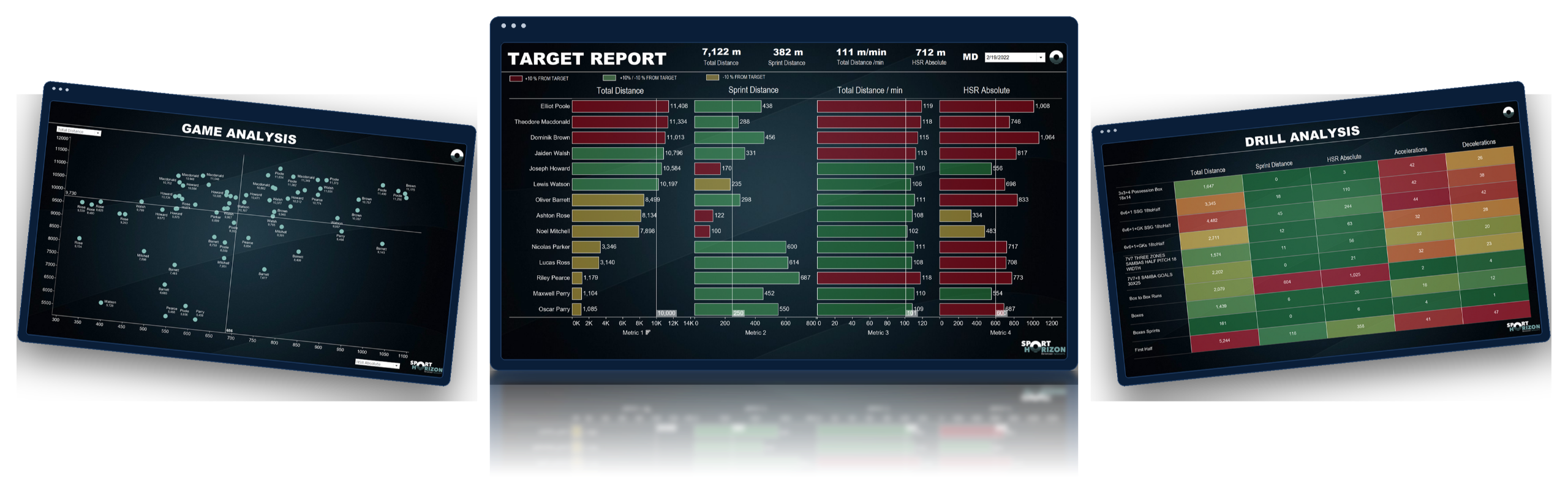
A Glimpse of What You’ll Build
Explore 3 of the dashboards you’ll build in this course with more projects and dashboards waiting for you inside.
Course Content
Learn step-by-step how to clean data, build custom sports calculations, and deliver interactive Tableau reports designed for practitioners in sport.
- Welcome: Course setup, structure, and getting started with Tableau for Sport Science.
- Preparing Your Raw Files: Formatting raw datasets for seamless integration.
- Storing Options: Overview of local and cloud storage setups.
- Connecting Cloud Data: Linking directly to SharePoint, OneDrive, and Dropbox.
- Connecting Locally: Connecting Tableau to local file directories.
- Power Query Editor Introduction: Master the essentials of data transformation.
- View and Modify Data: Cleaning, filtering, and structuring raw inputs.
- Creating Calculations: Foundation for metrics and custom calculated fields.
- Practical Sports Science Calculations: Metrics like % max speed, intensity, and thresholds.
- Group by Function: Aggregating data across sessions and players.
- Tableau Introduction: Workspace setup and UI navigation.
- Session Report: Crafting individual and team session overviews.
- Weekly Report: Tracking cumulative load and weekly trends.
- Target Report: Benchmarking against target loads and thresholds.
- Benchmarking Report: Evaluating player output against match demands.
- Drill Analysis: Deep dives into specific training drills and contextual load.
- Match Demands: Visualizing game intensity and high-speed running.
- BONUS - Showcase Your Work: Opportunities to get feedback and present your dashboards.
- Exporting Dashboard Images: Generating clean static visuals for staff PDFs.
- Publishing Online: Sharing reports via Tableau Public / Server.
- Live Connection: Setting up auto-refreshing connections for live data.
- Tips and Tricks: Efficiency shortcuts for daily workflow.
- Student Licence: Accessing educational licensing for Tableau.
- Next Steps: Continuing your data journey with Sport Horizon.
- One Last Message: Final thoughts & course feedback.


We support you on the journey
I would like to emphasize the remarkable responsiveness of the course's creators, Ciaran and Johannes, in swiftly addressing any challenges we may encounter during the learning journey. Their unwavering support has proven to be an invaluable asset, significantly enhancing my overall learning experience.
Yannis Irid
PhD Candidate, INSEP French National Institute of Sport

Brendan Lazarus
North Melbourne FC — Head of Sport Science
“The Power BI for Sport Scientists course was an absolute game-changer for anyone in the high-performance field. The tailored content and real-life sports data examples provided an incredibly insightful and applicable learning experience. From athlete performance tracking to in-depth statistical analysis, this course offered a comprehensive understanding of how to harness Power BI's capabilities for optimizing sports data management and decision-making processes.”

Ryan Davies
QPR FC — Sport Scientist
“This course has transformed how I report GPS data and hugely increased coaches’ engagement with training load. Would recommend this course to anyone working with any sort of sports performance data and analysis.”

Sophie Grimson
Brighton & Hove Albion — Physical Performance Data Scientist
“Can’t recommend this course highly enough to any sport science practitioners looking to enhance their data analysis and visualisation skills. The industry is currently lacking specific examples and support for practitioners to embed Power BI and Tableau into their daily workflow. This course specifically helps with forming reports to produce training load analysis via Power BI and I now use these daily.”

Lucas Posthuma
Almere City FC — Sport Scientist
“Although I was already familiar with Power BI, this course was really helpful. It started with the basics and then delved into real world situations with some really good examples on how to create different dashboards. I especially liked the fact that all the thinking behind the calculations and graphs was explained very well. The course was separated in different modules which eased the learning process. So, both for beginners and for more experienced users this course can be useful if you want to get your message across in a clear way.”

Conor Smith
Wexford GAA — Sport Scientist
“Power BI for Sport Scientists is a great all in one learning tool for sports practitioners that are interested in adding to their skill set. As a beginner, Level 1 of the course guided me step-by-step through building a functional database, as well as creating several efficient and informative dashboards/visualisations. Subsequently, these dashboards provided a strong foundation whereby I could confidently convey key messages to players, coaches and medical staff.”

Yannis Irid
INSEP French National Institute of Sport — PhD Candidate
“The course provides an outstanding introduction to the world of data visualization, especially within the unique context of sports. The competencies I gained through this course have empowered me to communicate with precision and effectiveness among diverse staff members. I am now proficient in crafting comprehensive and pertinent reports, which play a pivotal role in guiding our decisions concerning player load management.
Furthermore, I would like to emphasize the remarkable responsiveness of the course's creators, Ciaran and Johannes, in swiftly addressing any challenges we may encounter during the learning journey. Their unwavering support has proven to be an invaluable asset, significantly enhancing my overall learning experience.
I wholeheartedly recommend this course to all professionals, be they sports scientists or strength and conditioning coaches. It presents an exceptional opportunity to cultivate indispensable skills in the realm of data visualization tailored for the world of sports.”

Jacob Hurwitz
Mississippi State University — Athlete Engineering
“The Power BI for Sport Scientists course was an absolute game-changer for anyone in the high-performance field. The tailored content and real-life sports data examples provided an incredibly insightful and applicable learning experience. From athlete performance tracking to in-depth statistical analysis, this course offered a comprehensive understanding of how to harness Power BI's capabilities for optimizing sports data management and decision-making processes.”
Tableau for Sport Scientists — Level 1
- Connecting to cloud & local data sources
- Power Query Editor for data cleaning
- Practical sport science calculations
- Building interactive session & weekly reports
- Publishing & sharing Tableau dashboards
- Training data & templates included
Course Information
Frequently Asked Questions
This is a step-by-step, self-paced online course, that you can complete in your own time. There are over 35 videos across multiple modules and topics, of which you will maintain access to. You can start and finish the course whenever you want.
You don't need any prior knowledge or experience of Tableau. You can be a beginner, intermediate, or expert level practitioner. As we will take you through a journey from the very beginning of how to clean and manipulate your data, connect it, to the point where you are creating beautiful, engaging visualisations that give intelligent insights...with the ability to publish and share those dashboards and reports with your coaching and performance staff.
Tableau software is not available through this course, but there are some solutions available on the Tableau website. Anyone can access their 14 day free access trial on their website here: Tableau Free Trial.
If you are a student at an academic institute, you can access a year-free license from Tableau here: Tableau Academic License.
Finally, Tableau software may be available through your organisation.
On finishing the course, you will receive an online certificate of completion. Though this is not yet accredited by an academic institution of professional accrediting body, we hope it becomes a standard-bearer of quality in the professional sporting arena. It signifies the student's high level of knowledge, competence, and technical ability around using this data analysis solution upon successful completion of this course. Finally, we hope in time that this industry-level certificate will be accredited by academic institutes and professional bodies.
Yes, we offer a student discount. Please fill out the form on our Student Discount Page in order to receive your discount.
Sure, we can provide an invoice with your VAT number. Just email us at [email protected] with your details, and we'll send you a customized invoice.
Yes, we offer the option to pay for the courses in instalments. You select the payment option you prefer at checkout. If you require further options, please send an email to [email protected].
-
Welcome and Introduction
- Course introduction
-
Module 1: Connecting (Getting Started)
- Preparing the raw file
- Various storing options and connectors in Tableau
- Connecting to SharePoint / OneDrive
- Connecting to DropBox
- Connect locally and combine files together
-
Module 2: Data Preparation in Power Query Editor
- Power Query introduction
- Basic data manipulation (remove columns, renaming, changing order, filtering, sorting, adding a calculation)
- Removing / adding applied steps
- Duplicating a dataset / table
- Loading the table into Excel after manipulation
-
Module 3: Visualisation / Report Building
- Session report
- Weekly report
- Game / session benchmarking report
- Target report
- Drill analysis
- Match demands
- All step-by-step with lots of tips and tricks
-
Module 4: Publishing & Sharing
- How to publish to Tableau Cloud
- Refreshing the data from SharePoint
- Export to PDFs
- Screenshots and sharing
- Short introduction to Tableau Cloud
-
Module 5: Moving Forward
- Key take-aways
- Tips and tricks functions
- Trends
- Next steps
- Course Quiz Feedback
We currently offer subtitles in four different languages: English, Spanish, Italian, and French. If you miss any other languages, please reach out to [email protected].